## [C#] 데이터그리드뷰(콤보박스) 값 변경 이벤트
코딩정보/C#
2020-05-06 18:05:21
* * *
안녕하세요
코딩연습생입니다
이번 포스팅은 C# WINFORM에서 데이터드리트뷰(DataGridView)를 사용하실때
뷰안에서 값 변경이 일어났을때 이벤트를 캣치해서 행위를 할려고 할때 해당 뷰의 내용의 셀(Cell)이 콤보 박스 일 경우
에는 이벤트가 먹질 않습니다
그래서 이런 경우 이벤트를 발생시킬수 있는 방법을 알려드리고자 합니다
이미 많은 분들이 알고 계실듯 한데 언제나 처럼 기록과 혹시나 모를 분들을 위해 포스팅 합니다
보통 데이터그리드뷰에서 값 변경 이벤트로 사용되는 이벤트 함수는
CellValueChanged() 함수를 사용하는데요 다른 타입의 셀은 모두 반응하는데 이상하게 콤보박스만 반응하지 않습니다

이럴때는 다음과 같이 이벤트를 걸어주면 사용할 수 있습니다
첫번째 이벤트 함수는 EditingControlShowing() 함수 입니다

위와 같이 이벤트를 생성하시고 다음과 같이 콤보 박스에 아이템을 설정해 줍니다
private void sGridView1_EditingControlShowing(object sender, DataGridViewEditingControlShowingEventArgs e)
{
if (sGridView1.CurrentCell.ColumnIndex == 3)
{
int rowIndex = this.sGridView1.CurrentCell.RowIndex;
string y1Name = this.sGridView1.Rows[rowIndex].Cells[3].Value as string;
ComboBox comboBox = e.Control as ComboBox;
if (comboBox != null)
{
object value = comboBox.SelectedItem;
comboBox.SelectedIndexChanged -= comboBox_SelectedIndexChanged;
comboBox.Items.Clear();
if (y1Name.Length > 0)
{
comboBox.Items.AddRange(new object[] { "Y", "N" });
}
comboBox.SelectedItem = value;
comboBox.SelectedIndexChanged += comboBox_SelectedIndexChanged;
}
}
}
그리고 EditingControlShowing() 함수가 동작했을때 정의한 콤보박스에 SelectdIndexChanged 함수가 동작하게
합니다
private void comboBox_SelectedIndexChanged(object sender, EventArgs e)
{
try
{
if (sGridView1.CurrentCell.RowIndex >= 0)
{
if (sGridView1.CurrentCell.ColumnIndex == 3)
{
if (sGridView1.Rows[sGridView1.CurrentCell.RowIndex].Cells[5].Value != null)
{
this.sGridView1.CommitEdit(DataGridViewDataErrorContexts.Commit);
this.sGridView1.UpdateCellValue(sGridView1.CurrentCell.ColumnIndex, sGridView1.CurrentCell.RowIndex);
//이벤트 발생시 동작할 내용 부분
}
}
}
}
catch (Exception exception)
{
MessageBox.Show(exception.ToString());
}
}
위의 comboBox_SelectedIndexChanged() 함수는 직접 타이핑해서 생성하였습니다
마지막으로 CellClick() 함수 입니다

생성된 CellClick() 함수에 아래와 같이 코딩을 합니다
private void sGridView1_CellClick(object sender, DataGridViewCellEventArgs e)
{
if ((e.RowIndex < 0) || (e.ColumnIndex < 0))
{
return;
}
if (e.ColumnIndex != 0)
{
return;
}
DataGridViewRow dataGridViewRow = this.sGridView1.Rows[e.RowIndex];
DataGridViewCell dataGridViewCell = dataGridViewRow.Cells[e.ColumnIndex];
if (dataGridViewCell is DataGridViewComboBoxCell)
{
sGridView1.CurrentCell = dataGridViewCell;
sGridView1.BeginEdit(true);
DataGridViewComboBoxEditingControl comboboxEdit = (DataGridViewComboBoxEditingControl)this.sGridView1.EditingControl;
if (comboboxEdit != null)
{
comboboxEdit.DroppedDown = true;
}
}
}
동작 순서는 이렇습니다 데이터 그리드뷰의 컨트롤에서 셀 클릭이벤트가 발생하게 되면 EditingControlShowing()를
호출하게 되어 콤보박스가 동작 할 수 있도록 이벤트를 활성화 해주구요
콤보박스가 동작한뒤에 값이 변경되는것이 감지 되어지면 comboBox_SelectedIndexChanged()가 호출되어 지는 겁니다
이렇게 하시면 데이터드리드뷰에서도 콤보박스의 값 변경 이벤트를 사용할수 있게 됩니다
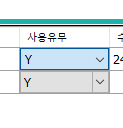
디버깅 모드 상태에서 아래 그림처럼 그리드 뷰의 콤보 박스의 값을 변경하게 되면
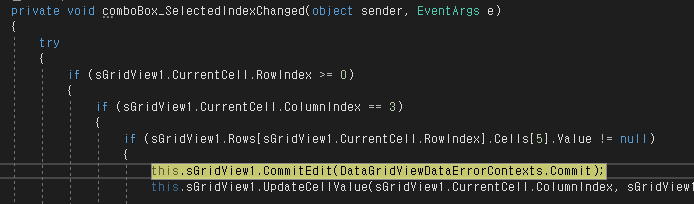
이렇게 중단점이 걸리는 걸 보실수 있습니다
#c# #DataGridView #데이터그리드뷰 #값 변경 이벤트 #데이터그리드뷰 콤보박스 #콤보박스 이벤트 #데이터그리드뷰 값 변경 이벤트
(*No embedded English lines found. Add translations later.*)