## [C#] OpenCvSharp 이진화 효과 주기
코딩정보/OpenCv
2019-12-30 10:05:39
* * *
안녕하세요
저번 시간에 이미지 그레이 효과 주기를 포스팅 했었는데요
이어서 이번에는 이미지에 이진화 효과 주기를 포스팅 해보도록 하겠습니다
저번 포스팅과 연결되어 진행 되오니 아래 링크를 확인해서 저번 포스팅을 확인해 보세요
<https://codingman.tistory.com/51>
[ [C#] OpenCvSharp 그레이 효과 주기 안녕하세요 요즘 C#으로 연습중인 OpenCv에서 불러온 이미지에 전체 그레이 효과를
주는 이벤트를 제작해 보겠습니다 C#을 통해 OpenCv 라이브러리 등록방법은 아래 링크를 확인해주세요
https://codingman.tistor.. codingman.tistory.com
](https://codingman.tistory.com/51)
[디자인]
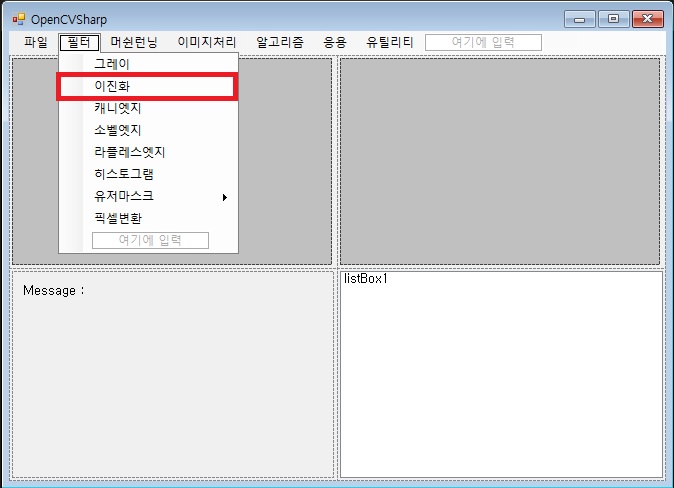
\- Menu에 다음과 같이 필터 -> 이진화 메뉴를 등록해 줍니다
[Source Code]
\- 이진화 메뉴에 클릭이벤트 생성
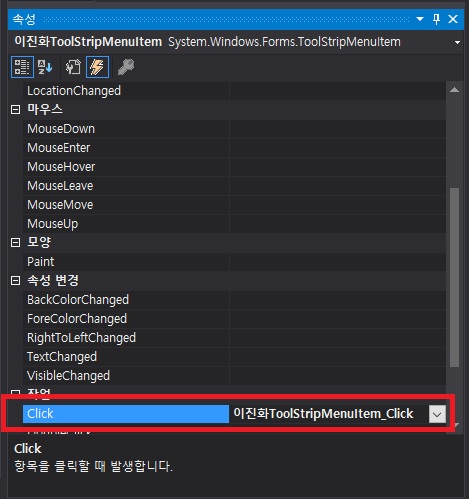
\- 이벤트 위치에 다음과 같이 코딩해 줍니다
private void 이진화ToolStripMenuItem_Click(object sender, EventArgs e)
{
using (gray gg = new gray())
using (IplImage temp = gg.ThresholdProcess(src))
{
result = temp.Clone();
}
pictureBoxIpl2.ImageIpl = result;
}
\- 그리고 저번 시간 생성했던 gray.cs 클래스 파일을 똑같이 적용 시킵니다
(이미 저번 포스팅에 사용한 gray 클래스 파일에 코딩내용이 포함되어 있음)
(혹시 귀찮은 분들을 위해서 다시 작성함)
using System;
using System.Collections.Generic;
using System.Text;
using OpenCvSharp;
namespace OpenCV_V1
{
class gray : IDisposable
{
IplImage subgray;
public IplImage grayProcess(IplImage src)
{
subgray = new IplImage(src.Size, BitDepth.U8, 1);
Cv.CvtColor(src, subgray, ColorConversion.BgrToGray);
return subgray;
}
public void Dispose()
{
if (subgray != null) Cv.ReleaseImage(subgray);
}
public IplImage ThresholdProcess(IplImage src)
{
subgray = new IplImage(src.Size, BitDepth.U8, 1); //메모리 확보
Cv.CvtColor(src, subgray, ColorConversion.BgrToGray); //그레이로 변환
Cv.Smooth(subgray, subgray, SmoothType.Gaussian, 5); //가우시안 스무스 주기
Cv.Threshold(subgray, subgray, 120, 255, ThresholdType.Binary); //120은 기준이 될 임계치
return subgray;
}
public IplImage BuildCanny(IplImage src)
{
subgray = new IplImage(src.Size, BitDepth.U8, 1); //메모리 확보
Cv.CvtColor(src, subgray, ColorConversion.BgrToGray); //그레이로 변환
Cv.Canny(subgray, subgray, 80, 255);
return subgray;
}
public IplImage BuildSobel(IplImage src)
{
subgray = new IplImage(src.Size, BitDepth.U8, 1);//메모리 확보
Cv.CvtColor(src, subgray, ColorConversion.BgrToGray); //그레이로 변환
Cv.Sobel(subgray, subgray, 1, 0, ApertureSize.Size3);
return subgray;
}
public IplImage BuildLaplace(IplImage src)
{
subgray = new IplImage(src.Size, BitDepth.U8, 1);//메모리 확보
using (IplImage temp = new IplImage(src.Size, BitDepth.S16, 1))
using (IplImage graytemp = new IplImage(src.Size, BitDepth.U8, 1))
{
Cv.CvtColor(src, graytemp, ColorConversion.BgrToGray); //그레이로 변환
Cv.Laplace(graytemp, temp);
Cv.ConvertScaleAbs(temp, subgray);
return subgray;
}
}
}
}
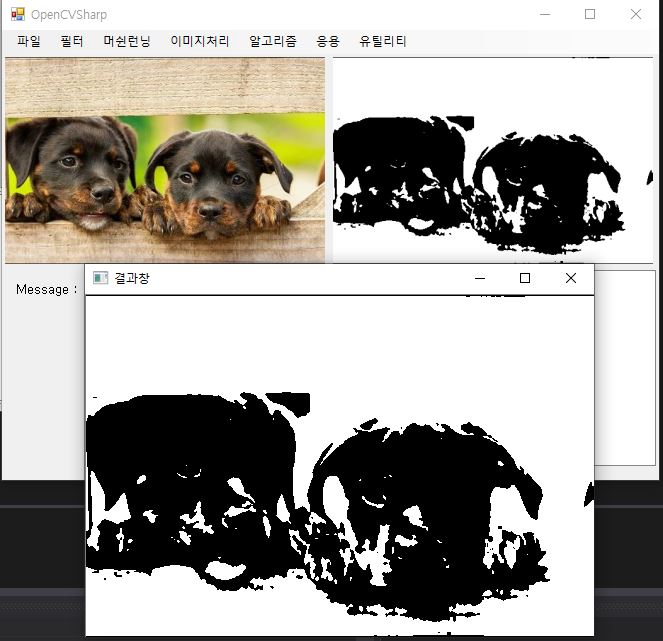
\- 위의 과정을 모두 하셨다면 프로그램 실행한 후에 이미지를 불러온뒤에 이진화 버튼 클릭하면 변경 됩니다
#c# #이진화 #opencv #opencvsharp #이진화처리 #이미지이진화
(*No embedded English lines found. Add translations later.*)